Example Internal Audit Reviews

The Finance Department of any business is typically a key focal area for any Internal Audit team. Naturally, Finance has a number of risks, and as such, it is important that sufficient and appropriate audit work is undertaken within this area each year.
We have been slowly building a range of Audit Programme’s to assist Internal Audit teams perform a review of the many functions that sit within Finance.

On this page you will find a range of example internal audit reviews.
For each example internal audit, you will find a template Work Programme, or a complete set of templates for that particular audit topic. Templates will be added as and when they become available, meaning you may find that only the work programme is available and not the entire suite of templates. Please be patient… we will attempt to upload all of these as quickly as possible, however to be the first to know of our new templates, you should subscribe to our mailing list by clicking here.
As with all of our templates, a free copy of the template can be viewed here, otherwise editable and unredacted versions of our templates can be purchased online at our Shop.
Example / Template Internal Audit Reviews developed for the Finance Department so far include:
- Accounts Payable
To view these template documents, please click on the links further below.
Accounts Payable

Free templates
Click on the links below to view free Example Accounts Payable Audit templates:
- Accounts Payable Audit Work Programme – Word
Editable templates
Click on the links below to view editable templates for an Accounts Payable Audit review:
- Accounts Payable Audit Work Programme – Word

Free templates
Click on the links below to view free Example Asset Management Audit templates:
- Asset Management Audit Work Programme – Word
Editable templates
Click on the links below to view editable templates for an Asset Management Audit review:
- Asset Management Audit Work Programme – Word
Please keep visiting this page as it will be updated when more audits are made available.
Got an idea on how to perform a good Finance audit, or have some questions to ask, some risks to discuss, or just general advice? You can raise a question on our Forum and the audit
community can help you with any questions you may have.

Timesheets, whilst painful, can offer a lot of benefits. We spoke about these benefits in a recent blog post (Time for timesheets). Whilst they also have a number of benefits, we need to be careful on how we introduce timesheets back into an audit team, particularly for those audit teams who have not previously had timesheets.

A good timesheet system can also be expensive. Whilst there are specific tools available, and teams can even purchase add on’s such as Timesheet for Microsoft SharePoint, reality is many teams will not want to purchase any systems; particularly where there is no chance of the costs being recovered. This is where we turn once again to our best friend, Microsoft Excel.
We have developed a simple, yet effective, Excel tool which allows audit team members to record time and have this translated into meaningful reporting for the management team to use. The reporting can assist in annual planning and ensure that the annual plan is both achievable and realistic, and based off the average time taken to complete a review as per the weekly timesheets.
Whilst our templates do require some manual intervention, we have develop some simple instructions to ensure the process is not too labour intensive and can be completed quickly. At the end of the day, timesheets should not take away from actually performing audit work.
Below is an overview of what the timesheet template and reporting dashboard looks like.


A copy of the free template can be viewed here.
To purchase an editable version of this template (and obtain the instructions), please click here.
This set of templates and reporting is quite basic, however it has the added benefit of being flexible and adaptable to suit the needs of you and your department.
How to introduce your audit to a first time auditee

Being audited for the first time can be scary; even more so if you don’t actually know anything about an audit. This is why, audit teams need to ensure that auditee is well aware of not only what the audit will be looking at, but more generally, how we do an audit.
But even for those business areas who have been privy to an audit before, its appropriate that we take the time to explain what the audit is, who will be a part of the audit, and our ways of working.
This is where our Intro to Audit Kit comes in handy.
To be used before we even start planning, the purpose of this kit is to give the business area under review and insight into audit. This kit will show the following:
- What is the audit
- Who is part of the audit team
- Who do we think will be key stakeholders from the business
- What the audit process is
- What our timelines are
- What happens next
An overview of the template is provided below.


To purchase an editable version of this kit, please click here.
As demonstrated by the kit, it is clear, easy to read and informative. Because of this, any business area which is about to be audited will clearly understand who their audit team is, when the audit is being performed, and what work is going to be done.
Keeping the ball rolling
It’s all well and good to start off with such an intro kit, however we have set the standard high. Going forward, it is good to leverage off this info kit and have weekly status updates. These updates will show progress in the audit, what tasks remain to be completed and what is happening next.
Above all, these templates will help encourage good conversation and build effective working relationships between both the Internal Audit team and business area under review.

Promoting the work of Internal Audit and raising awareness of who we are can help the business (and the audit function) in may ways. Whilst a newsletter may seem old school and extra admin on our already busy schedules, it can in fact pay dividends if done well.

There are many formats which an Internal Audit Newsletter can take. We have developed ours in Microsoft Word, meaning it can then be either turned into a PDF and distributed across the business, uploaded to an intranet page, or easily printable. Other options for your Internal Audit Newsletter can include:
- Posters
- Website Update
- Online Blog
When choosing how to develop and share your Internal Audit Newsletter, it is important to consider a few factors, such as:
- What will people most likely read?
- At what level should it be pitched?
- Is there any sensitive information which should not be shared?
- Whats the culture / view of internal audit we want to promote?
For instance, audit recommendation follow up / action tracking is always a sensitive topic. Whilst including statistics about it in the newsletter may help encourage business areas to implement actions quicker as they don’t want to be the worst area in the business, it may have the opposite effect, where business areas become disgruntled as the statistics don’t represent other factors which may have caused a delay in implementing recommendations.
Additionally, inclusion of the Annual Plan and its status may reduce the element of surprise needed when an internal audit is performed. Whilst business areas generally know an audit will be performed at a certain time, promoting the plan and the status may see business areas ‘tidy up’ their area’s before audit arrives.
Including this information in the newsletter should be considered before being sent around to ensure its going to achieve the desired outcomes, yet not damage the reputation of audit or the culture currently built up in the business.
Other items to include in your newsletter can be a ‘Tip of the Week’. Basic issues which are common in most audits, such as spreadsheet controls, can be included in the Tip of the Week section, allowing business areas to proactively audit themselves and fix the issue.
Additionally, promoting members of the audit team can help put a face to internal audit and also help build individuals networking across the business.
The Internal Audit Newsletter should not be an arduous process. It can also be the responsibility for a junior team member which allows them to take ownership and accountability.
To purchase an editable version of our Internal Audit Newsletter template, please CLICK HERE.
Making sure you know where the audits are at, and who’s doing what.
Performing a weekly status update is a great way to ensure all audits are on track and any issues are proactively addressed before its too late. Particularly where you have a large audit team, or a large number of audits in progress, the weekly status update is a great way to stay on top of everything which is going on.
We have built a template to help capture everything that’s going on in a simple and straight forward manner.
An overview of our Weekly Status Report template is included below:

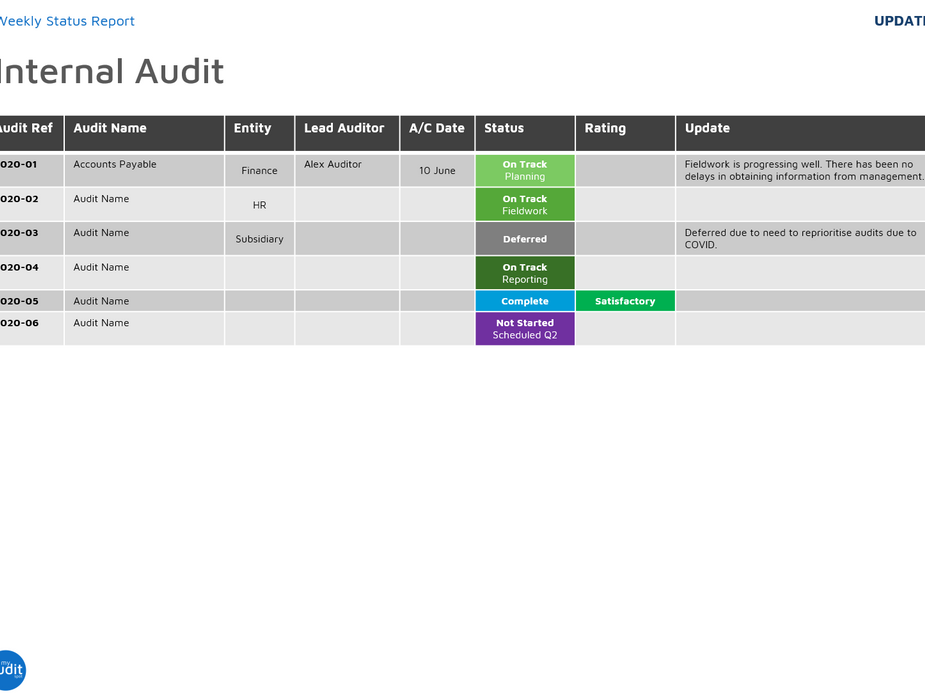


This is only an extract of some pages from the template. To download an editable version of the Weekly Status Update, please CLICK HERE.
To update the Weekly Audit Status document, below are some strategies I like to do:
- Hold a meeting. Set a weekly meeting, either early on a Monday or towards the end of the week. A Monday morning meeting means everyone can catch up briefly, but also set the tasks for the week. A Friday meeting might be a good way to wind down the week, combined with a bit of trivia (or drinks) and provide a retrospective status of all audits. The choice is yours when you want to hold the meeting.
- Set a revolving chair. Each status update meeting should be held by someone different in the team. Their responsibilities should include note taking / updating the Weekly Audit Status deck and directing the meeting. Not only does this ensure shared responsibility, but also helps build some softer skills such as holding engaging meetings and time management.
- Go around the circle. There are good and bad sides to this. By going around the circle and each team member providing an update on what they are working on for the week and their updates for each of their audits, team members may be able to ask for help should they have too much work on, or conversely, offer help should they have some capacity. The bad side is that some team members may see that as an opportunity to showboat. The “I do more than xx” and inclusion of every little task, may create tension in the team. Such instances should be managed careful so not to demotivate any team member. Regardless, by going around the circle, it ensures every team member gets a chance to talk.
- Update live! The template is in PowerPoint, meaning whether the meeting is face to face or virtual, the PowerPoint can be shared and viewed by others. The Chair should take ownership and share the deck on the projector and update the document live as people provide their updates. This saves time (as minutes are not taken out of the room and typed up later), but also ensure the update is accurate, as team members can review and provide feedback should the update be entered incorrectly.
- Communicate. Share the update once completed with the rest of the team via either email or saving it on the Shared Drive / Team pages.
When performing the meetings, make sure there is some flair. The meetings can be accompanied by either an award which might acknowledge someone who has done something great during the week, or even something silly – such as locking their keys in the car. Alternatively, a photo of the week, quiz, or cake, are all great ways to help liven up a meeting.
As with everything we do, its important to make sure all comments during the meeting are documented. If it’s not documented, its not done, and the Weekly Status Update can be extremely valuable should there be issues further down the track as it provides a rolling record each week.
For smaller teams or remote teams, this activity might want to be performed on a fortnightly basis.
To download an editable version of the Weekly Status Update template, please CLICK HERE.